



One KITforforClaude.
Every type style, surface and motion of the Axion design system — tokens, Tailwind utilities and React components, ready to build from.
01
Typography scale.
Inter carries everything — SemiBold titles, Regular text. Each style is one utility class with its responsive steps built in.
Scale
class · use- 01
Heading 1
type-h1 · hero · −0.035em
44 → 62 → 88 · short 36 → 48 → 64
Design system.
- 02
Heading 2
type-h2 · closing statement · −0.035em
36 → 64 → 80
Come do it professionally.
- 03
Heading 3
type-h3 · section title · −0.03em
34 → 48 → 56
A builder. Not just a researcher.
- 04
Heading 3 · tight
type-h3-tight · setup title · −0.035em
34 → 52
Set up in one prompt.
- 05
Heading 4
type-h4 · sticky list title · −0.03em
32 → 42 → 48
Axion MCP for
- 06
Heading 4 · list item
type-h4-item · active 100% / idle 45%
30 → 42 → 52
studying what winsbuilding from scratch - 07
Bold L
type-bold-l · step title · 600
17 / 23.4
Add the server
- 08
Bold M
type-bold-m · button label · 500
16 / 24
See pricing
- 09
Bold S
type-bold-s · eyebrow · tertiary
15 / 22.5
Trusted by design teams at
- 10
Paragraph
type-lead · hero & closing lead · secondary
17 → 20 · relaxed
Your agent searches real apps, opens real screens, and builds from what it finds.
- 11
Regular L
type-body-l · description · secondary
16 → 19 · relaxed
Point your agent at the best apps in your category. It walks them screen by screen, then builds yours to the same standard.
- 12
Regular M
type-body-m · section subtitle · tertiary
15 → 16
Axion is part of Pro — 1,500 credits a month, reset on the 1st.
- 13
Regular S
type-body-s · step hint · tertiary
13 / 17.9
Run it inside Claude Code and follow the browser.
Specialty faces
class · use- 14
Mono · code
type-mono-code · console line
13 / 21.5
$ npx skills add axion/axion-skills
- 15
Mono · label
type-mono-label · uppercase +0.08em
11 / 16.5
Prompt
- 16
Mono · index
type-mono-index · tabular-nums
12 / 18
01 02 03
- 17
Wordmark
type-wordmark / Wordmark · Comfortaa 600
20.75cqw · glint at the pointer
axion
02
Colors & surfaces.
One gold accent on a neutral ink ramp. Every token is an RGB triplet — rgb(var(--ax-…) / α) in CSS, bg-ink/90 in Tailwind.
Backgrounds & surfaces
class · rgbPage
bg-ink · 0 0 0
body, every section · bg-canvas adds the dot grid
Console
bg-ink-deep · 15 15 15
recessed code wells (.ax-console)
Card
bg-surface · 31 31 31
cards, wall tiles
Raised
bg-surface-raised · 38 38 38
chips, segmented track
Hover
bg-surface-hover · 50 49 49
tab and copy-button hover
Field
bg-wash/[0.06] · white 6%
search pill (lg 5%, hover 9%)
Selected
bg-label-primary · 247 247 247
active tab, action button
Accent
btn-accent · --ax-gold-grad · 244 219 143 → 214 163 41 → 184 135 26
primary fill, footer sheet
Text & labels
class · rgb- Aa
Primary
text-label-primary · 247
headings, active nav
- Aa
Secondary
text-label-secondary · 173
leads, descriptions
- Aa
Tertiary
text-label-tertiary · 122
captions, hints, idle nav
- Aa
Quaternary
text-label-quaternary · 79
“$” prompt, indices
- Aa
Accent
text-accent · 214 163 41
URLs, star, icons
- Aa
Accent word
AccentWord / .ax-accent-word · gold gradient
highlighted words
- Aa
Accent ink
text-accent-ink · 11 11 13
label on the gold
- Aa
Ink
text-ink · 0 0 0
label on a selected chip
Borders & status
classHairline
border-sep · white 8%
Strong
border-sep-strong · 15%
Ring
ring-1 ring-sep
● success
● warning
● critical
03
UI components.
Every component is live — hover, press and tab through them. Import from @/components/axion.
Button
accent: 16px semibold · h-14 (short: h-12) · gold fill, .975 on hover, .955 pressed. glass: 16px medium · white 16% border · arrow nudges 2px. action: 14px semibold block. beam adds the gold border beam.
Keycap, nav pill & nav link
Search, avatar & chips
Segmented control & console
$ npx skills add axion/axion-skillsGlass tiles
 AxionStrategyCreativesFunnelsScale
Cards & frames
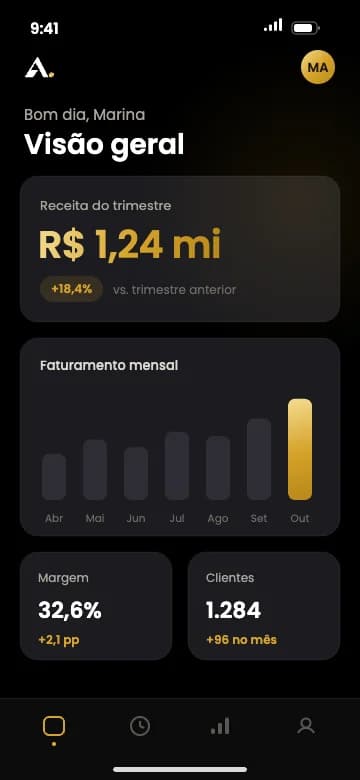
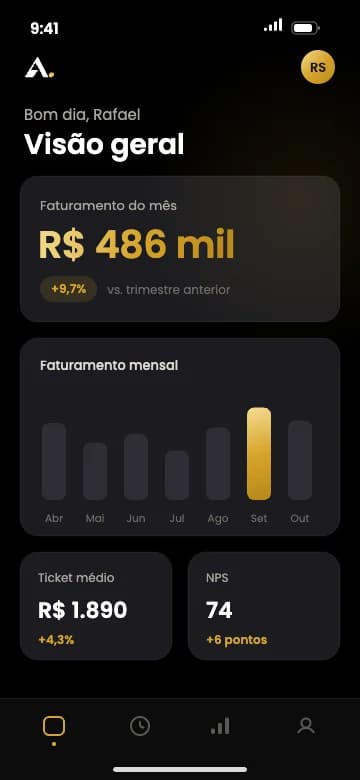
Surface + hairline
rounded-card border border-sep bg-surface · p-3 bar, p-5 / sm:p-7 rows.
Pattern · tabbed card with subgrid steps
live- 01
Add the server
One command, inside your project.
$ claude mcp add --transport http Axion https://consultoriaaxion.onrender.com/mcp - 02
Sign in
Run it inside Claude Code and follow the browser.
$ /mcp - 03
Install the skills
The research playbooks and the design bar, in one command.
$ npx skills add axion/axion-skills
04
Layout & spacing.
Two frames — 1440px for full-bleed rows, 1080px for reading — on 20 / 32px gutters, with sections breathing in 24 → 176px steps.
Containers & measures
class · max width- 011440px
Page frame
header, footer, full-bleed rows
mx-auto w-full max-w-page px-5 sm:px-8
- 021080px
Content column
cards, hero headline
mx-auto w-full max-w-content
- 03900px
Statement
closing headline
max-w-statement text-balance
- 04672px
Lead
hero & closing paragraphs
max-w-lead text-balance
- 05620px
Description
use-case copy
max-w-description
Radii
class · pxrounded-tile
10px · wall tile (sm: 12)
rounded-console
12px · console block
rounded-card
22px · cards
rounded-cap
48px · ink cap over the footer
05
Motion & interaction.
A handful of curves does all the work, each one an ease-* utility — and every motion stands down under prefers-reduced-motion.
Easing
class · curve- 01cubic-bezier(.32,.72,0,1)300–600ms
Spring out
ease-spring· fade-up, header, avatar - 02cubic-bezier(.25,1,.5,1)400ms
Glass press
ease-glass· .btn-accent, .btn-glass, pill - 03cubic-bezier(.22,1,.36,1)300–700ms
Expo out
ease-expo· roll word, legend swap - 04cubic-bezier(.34,1.4,.64,1)350ms
Overshoot
ease-overshoot· glass tile tilt & scale - 05cubic-bezier(.2,.8,.2,1)120ms
Key snap
ease-key· keycap press - 06cubic-bezier(.25,.46,.45,.94)1s
Blur
ease-blur· blur in - 07cubic-bezier(.16,1,.3,1).8s
Letter
ease-letter· letter reveal - 08cubic-bezier(.65,0,.35,1)1.5s
Column
ease-column· column rise - 09cubic-bezier(.4,0,.2,1).6s
Rotate
ease-rotate· card rotator
Clean motion · blur, reveal & light
19–25Blur in
out of 10px
0 · 100 · 200ms
Blur in
Content comes into focus as it scrolls in; siblings stagger through delay.
<BlurIn delay> · 1s ease-blur
Letter by letter.
Letter reveal
Each letter rises out of its own clip, 30ms after the last. One headline per view.
<LetterReveal> · .8s ease-letter · 30ms
rise left to right
Column rise
Hairline columns fill bottom-up behind a hero, with a gold wash at their feet.
<ColumnRise columns> · 1.5s ease-column
Border beam
A short gold arc runs the outline on hover; beam="live" keeps it running.
<Button beam> · @property angle · 2s linear
Flashlight
Light follows the pointer and neighbouring rims catch it. Every card in this gallery carries it.
<FlashlightGroup> + .ax-flash
Real-time sync
Status Active
Card rotator
Cards cross-fade and settle from .9 to 1; pauses on hover and off screen, dots jump.
<CardRotator interval> · .6s ease-rotate
Marquee
One set, rendered twice, slides half its width forever; the edges fade over 10%. Pauses on hover and off screen.
<Marquee duration> · 40s linear · mask 10% / 90%
Come do it professionally.
Every token, surface and motion — from the system that turned design into revenue.